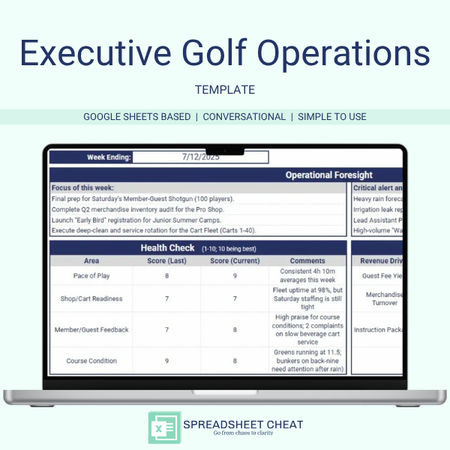
Elevate your club’s performance and eliminate operational blind spots with the Executive Golf Operations Template. Designed specifically for directors of golf, head pros, and superintendents, this dynamic tool bridges the gap between the pro shop, turf, and events. Streamline your weekly briefings and align your entire leadership team on pace of play, revenue targets, and course readiness.
- WHY YOU NEED THIS SPECIALIZED DASHBOARD -
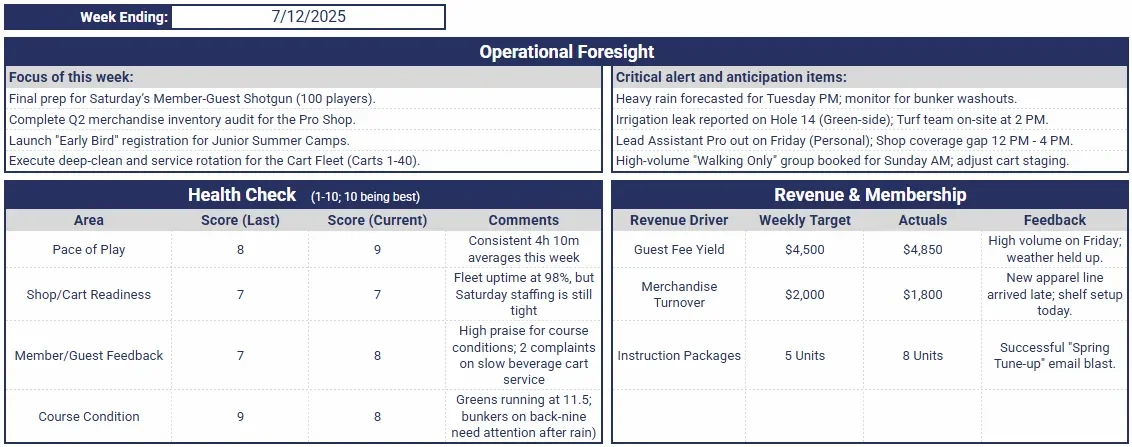
Operational Foresight: Move from reactive to proactive. Use the dedicated "Foresight" section to anticipate weather impacts, staffing gaps, and tournament hurdles before they affect the tee sheet.
High-Impact Health Checks: Monitor the four vitals of a successful club—Pace of Play, Shop/Cart Readiness, Member Feedback, and Course Condition—on a 1–10 scale.
Targeted Revenue Tracking: Focus on the "Big 3" revenue drivers: Guest Fee Yield, Merchandise Turnover, and Instruction Packages. Compare weekly targets against actuals with built-in feedback loops.
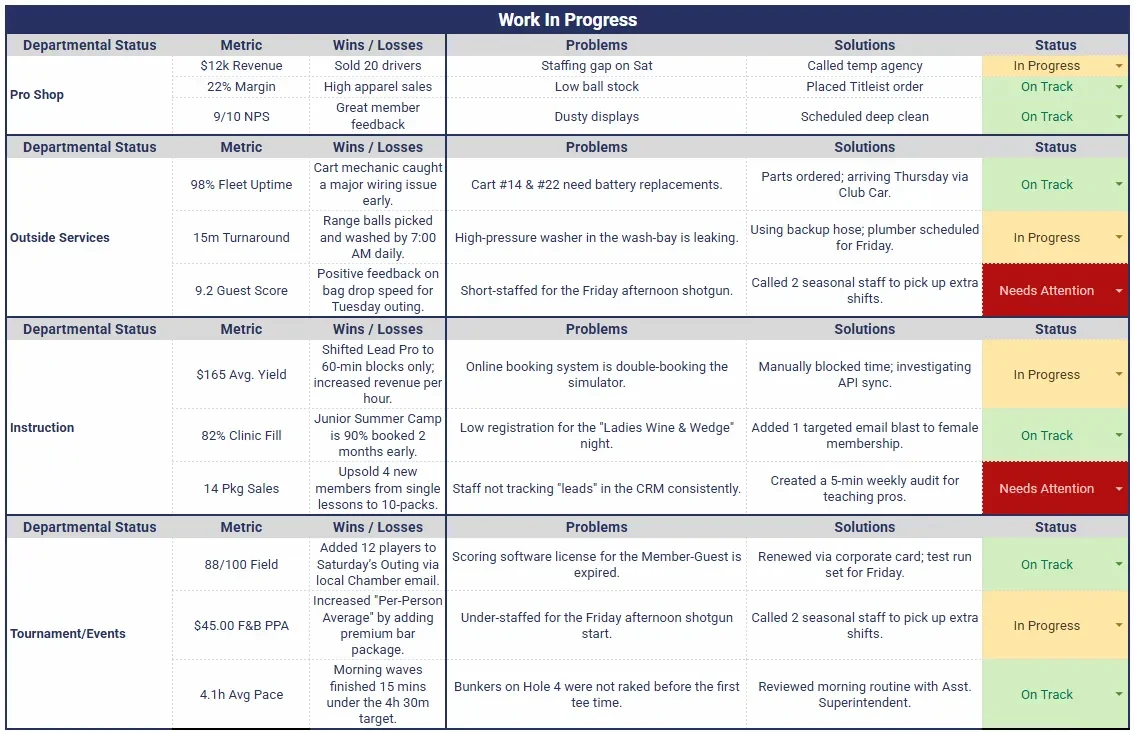
Departmental Triage (Work In Progress): Manage the Pro Shop, Outside Services, Instruction, and Tournaments in one view. Track specific metrics, identify root-cause problems, and document solutions with color-coded status dropdowns.
Critical Alert System: A centralized "Alerts" area ensures that irrigation leaks, equipment failures, or VIP member notes are never buried in a text thread or radio call.
Total Customization Control: While pre-loaded with golf-specific industry standards, every field is fully editable. Whether you manage a 9-hole municipal course or a high-end 36-hole private club, you can swap out metrics, rename departments, and adjust the health-check criteria to match your exact workflow.
- INCLUDED FEATURES -
Industry-Specific Interface: No generic "Project A" labels. This template is pre-loaded with golf-specific departments and metrics used by elite private and public courses.
The "Power of Three" Metric System: Unmerged data fields allow you to track financial, operational, and quality metrics simultaneously for every department.
Visual Status Signaling: Built-in Data Validation (Green/Yellow/Red) allows for a "5-second scan" to identify which department needs your attention most.
Automated Formatting: Clean, professional design suitable for printing and presenting at Greens Committee or Board of Directors meetings.
Open-Architecture Design: Unlike rigid software, our spreadsheet is unlocked. You have the freedom to change the formulas, add rows for additional departments (like Food & Beverage or Valet), and update the "Progress" dropdown labels to fit your team's internal vocabulary.
"Safe-Start" Master Tab: Includes a protected, blank master copy. Easily duplicate the template for new weeks, special tournaments, or seasonal shifts without the risk of breaking core formulas.
- NEED TO KNOW -
Compatibility: This template is optimized for Google Sheets. While it can be exported to Excel, Google Sheets is recommended for the best experience with color-coded dropdowns and collaborative staff updates.
Visual Consistency: Colors may vary slightly between digital displays and printed reports due to individual device calibrations.
- POST PURCHASE NOTES -
Digital Download: This listing is an instant DIGITAL DOWNLOAD ONLY. No physical product will be shipped.
Affiliation: Spreadsheet Cheat is not affiliated with Google Sheets or the USGA.
Refunds: As this item is an instant digital download, all transactions are final. Order cancellations, returns, and exchanges are not permitted.
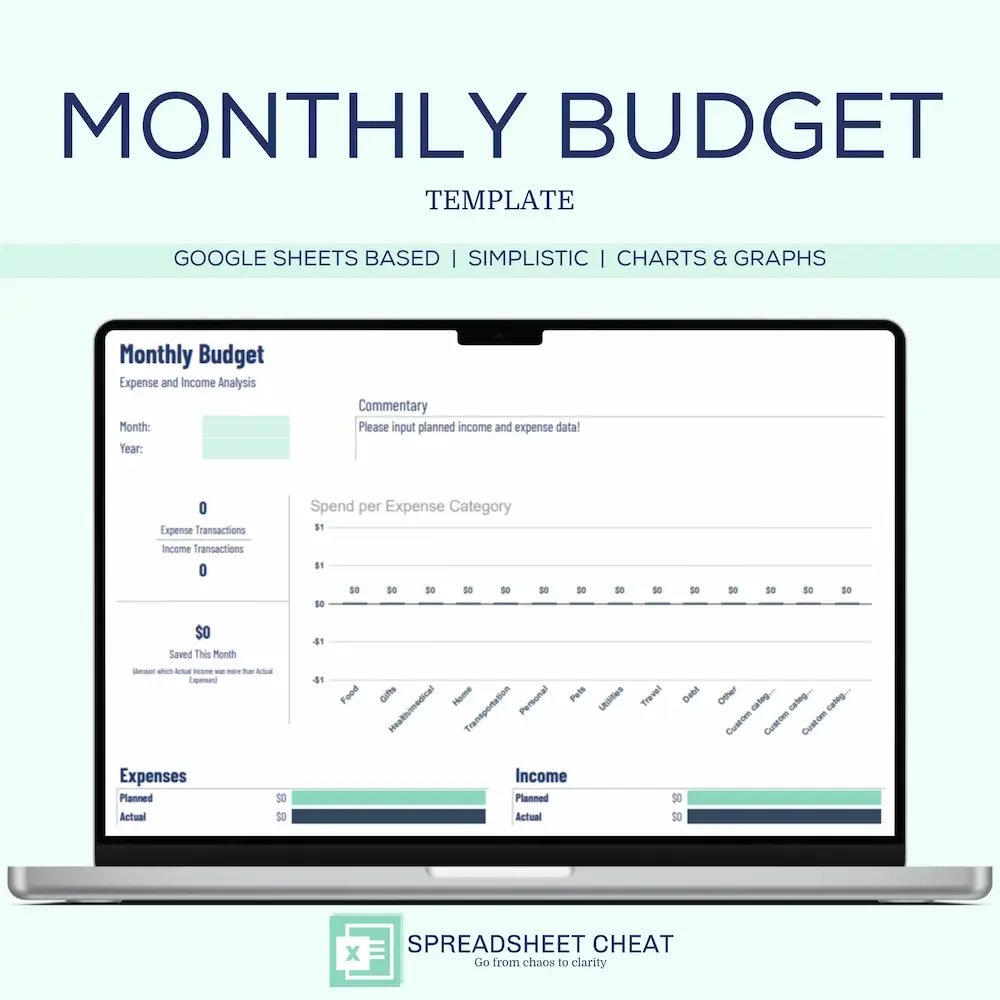
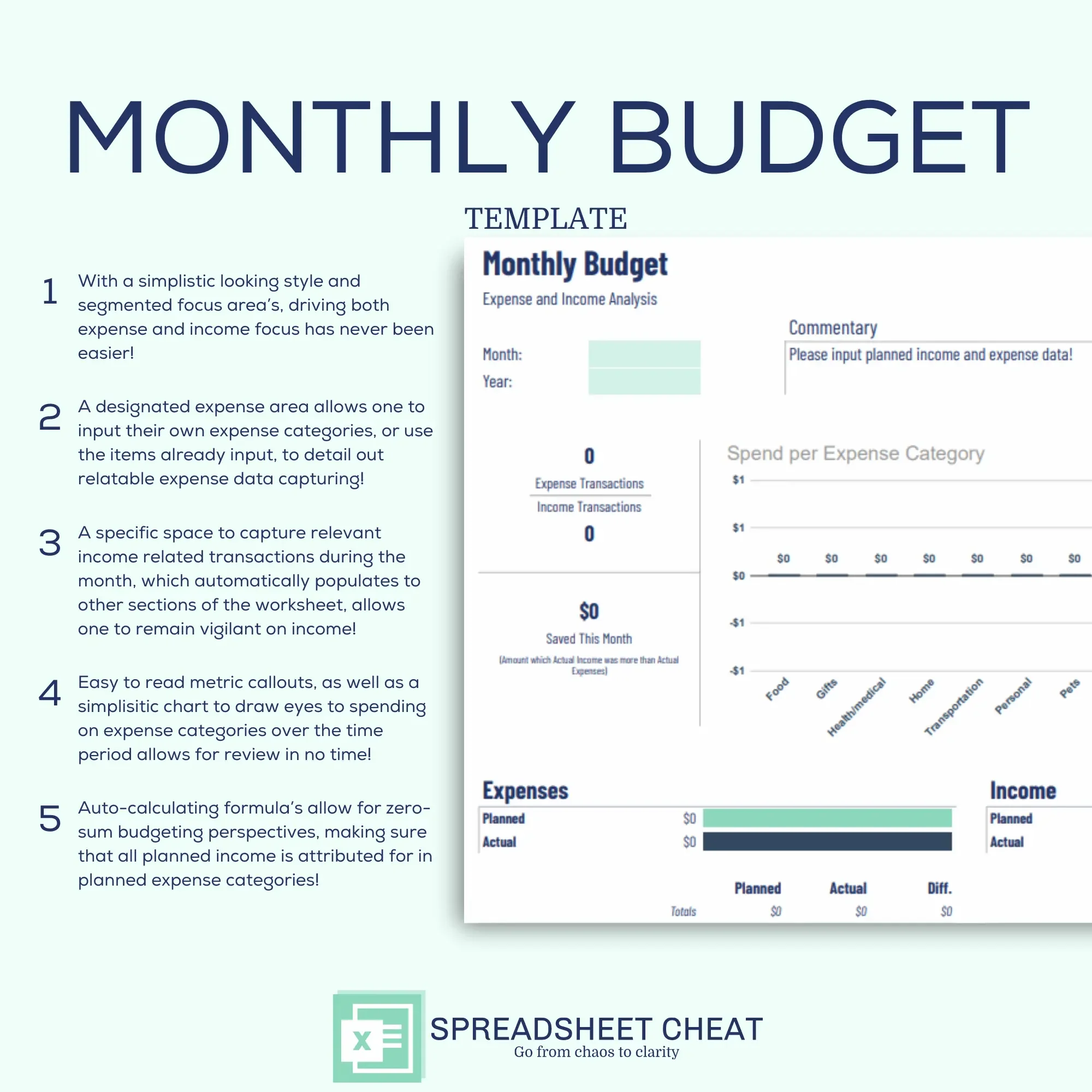
Take control of your finances and achieve your financial goals with our Simplistic Monthly Budget Spreadsheet Template, a versatile Google Sheets tool designed to simplify budgeting and empower financial planning. Whether you're managing personal finances, overseeing a household budget, or seeking effective money management solutions, our template provides the tools you need to make informed decisions and track your progress effortlessly.
Effortless Budgeting: Simplify your budgeting process with our user-friendly layout, allowing you to allocate funds to various categories effortlessly. Say goodbye to complicated spreadsheets and hello to stress-free budgeting.
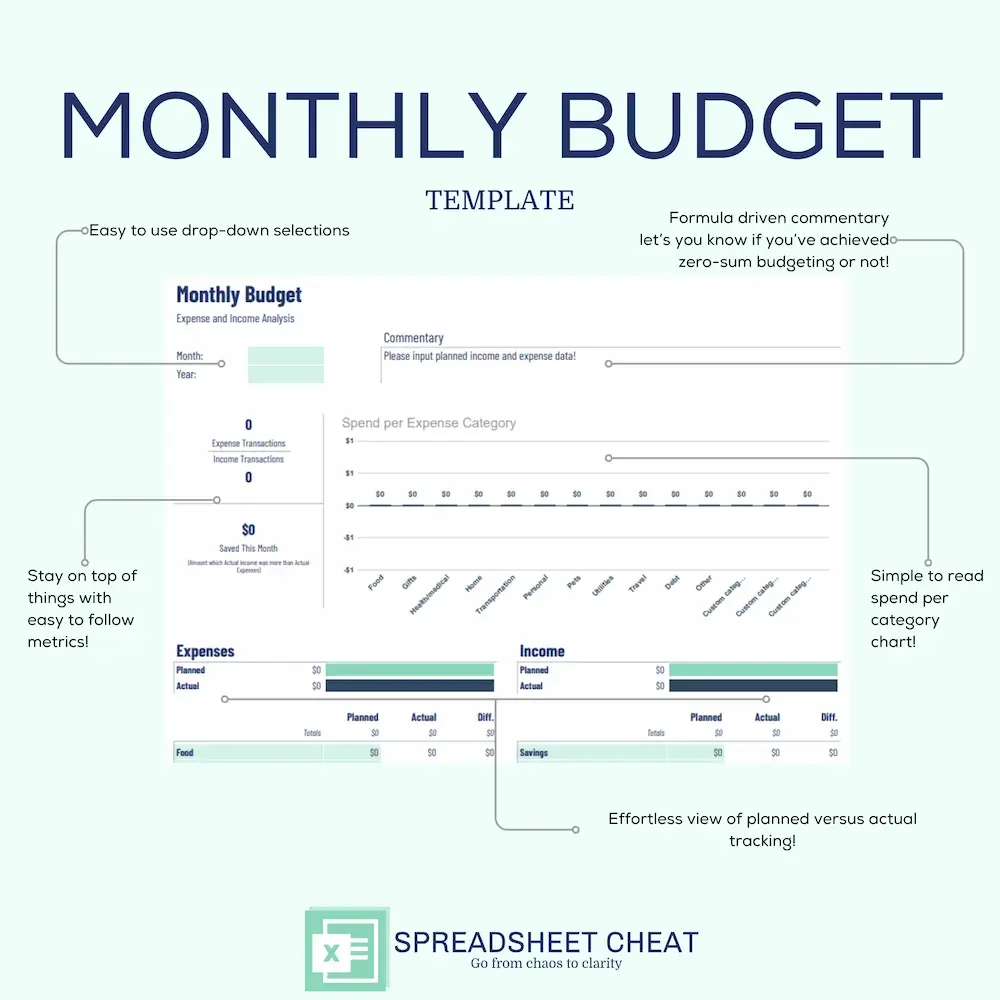
Customizable Times: Tailor your budget to your needs with customizable month and year dropdowns, ensuring flexibility and adaptability to changing financial circumstances.
Clear Visualization: Gain insights into your spending habits with easy-to-read metrics and spending-per-category charts. Visual representations make it simple to understand where your money is going and where adjustments can be made.
Zero-Sum Budgeting Made Easy: Take control of your finances with zero-sum budgeting using planned budget amounts. Ensure every dollar has a purpose by assigning it to specific categories, helping you stay on track toward your financial goals.
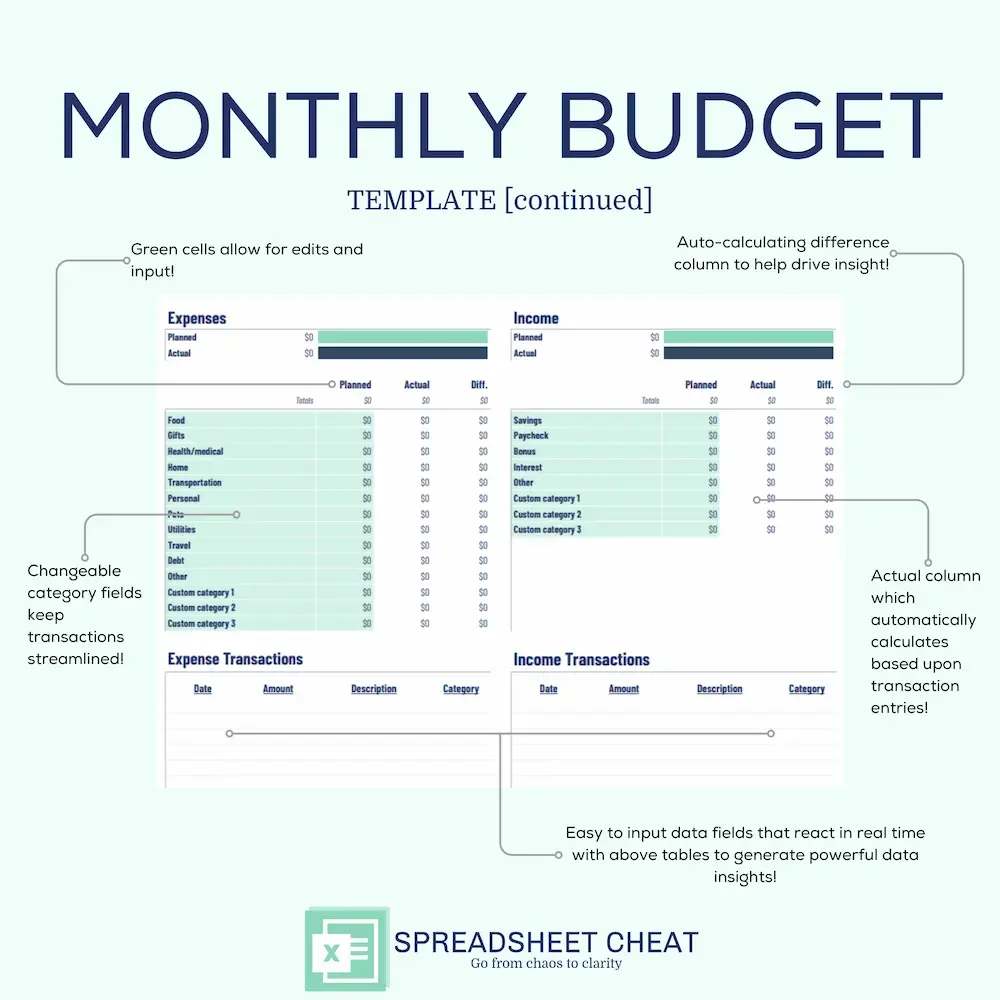
Streamlined Transaction Input: Save time with auto-calculation against planned budget amounts. Simply input your transactions, and our spreadsheet will do the rest, providing real-time updates on your budget status.
Intuitive Interface: Designed for simplicity, our template is accessible to users of all levels. No complex formulas—just straightforward fields for seamless navigation and budget management.
Flexible and Expandable: Adapt the template to your unique financial situation. Easily duplicate tabs for multiple times, allowing you to plan and track your progress over time.
Insightful Data Analysis: Improve your understanding of your financial health with comprehensive data insights. Our template generates visual representations, including charts and trendlines, making it easy to identify trends and make informed decisions.
Time-Saving Automation: Say goodbye to manual data entry with our streamlined transaction input. Spend less time crunching numbers and more time achieving your financial goals.
Compatibility: This template is compatible with Google Sheets. While transferring to other platforms like Microsoft Excel or Mac Numbers is possible, consistent formatting and structure are not guaranteed.
Visual Consistency: Colors may vary slightly between digital and in-person displays due to individual device color calibrations.
This listing is an instant DIGITAL DOWNLOAD only; (no physical product will be shipped).
Affiliation: Spreadsheet Cheat is not affiliated with Google Sheets.
Refunds: As this is a digital download that occurs instantly, all transactions are final. Order cancellations, returns, and exchanges are not permitted, as digital purchases are inherently irrevocable.
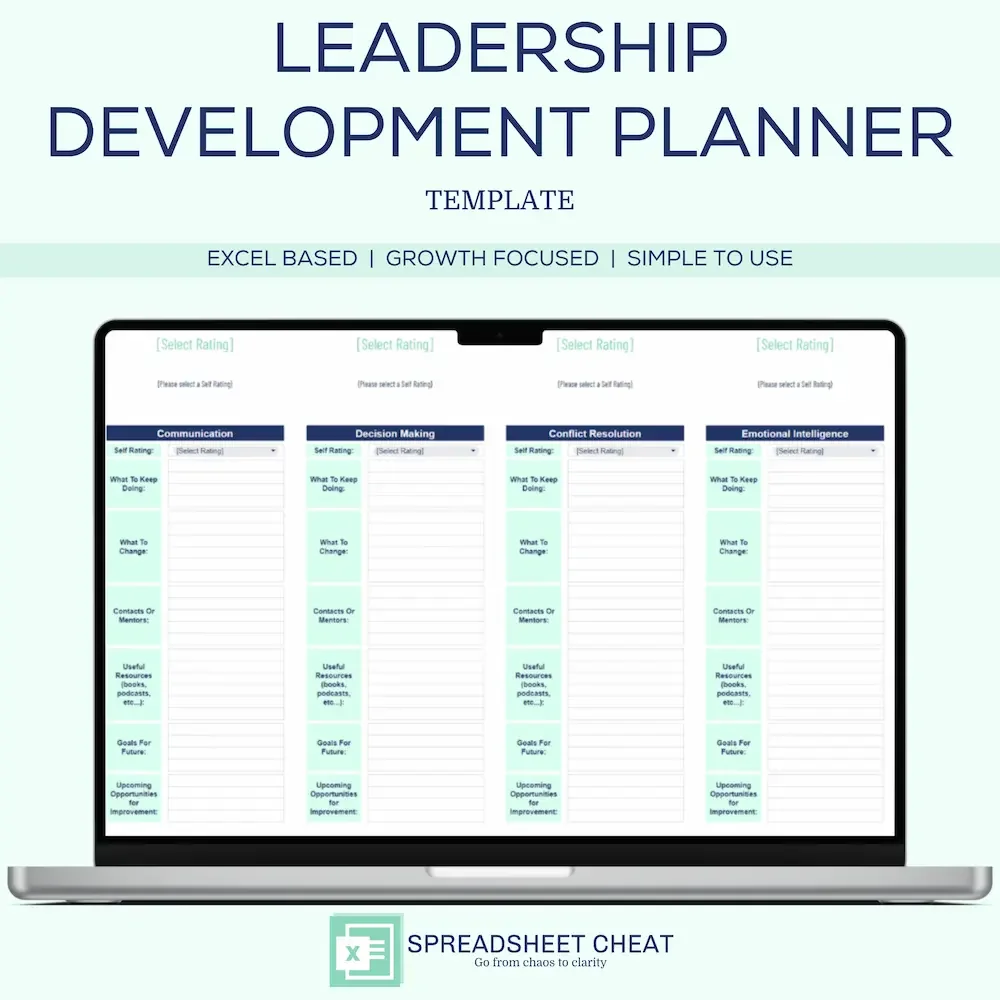
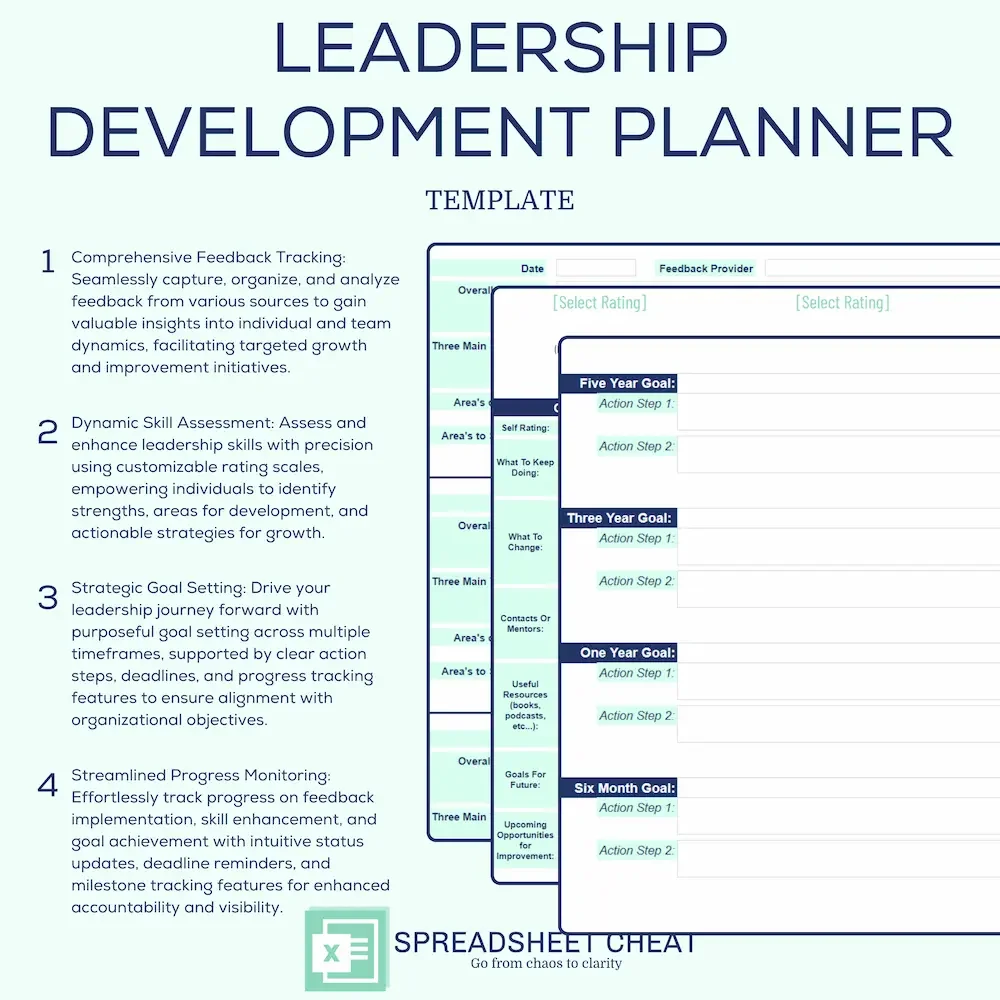
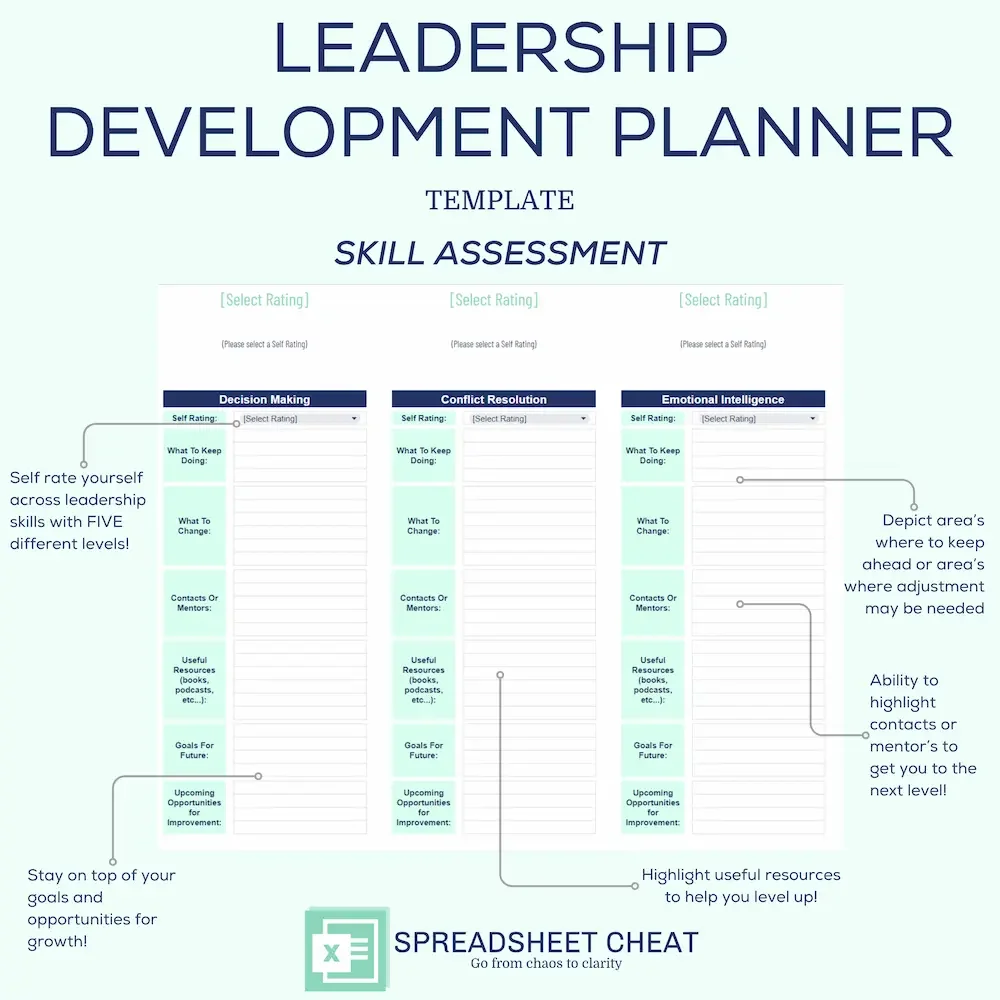
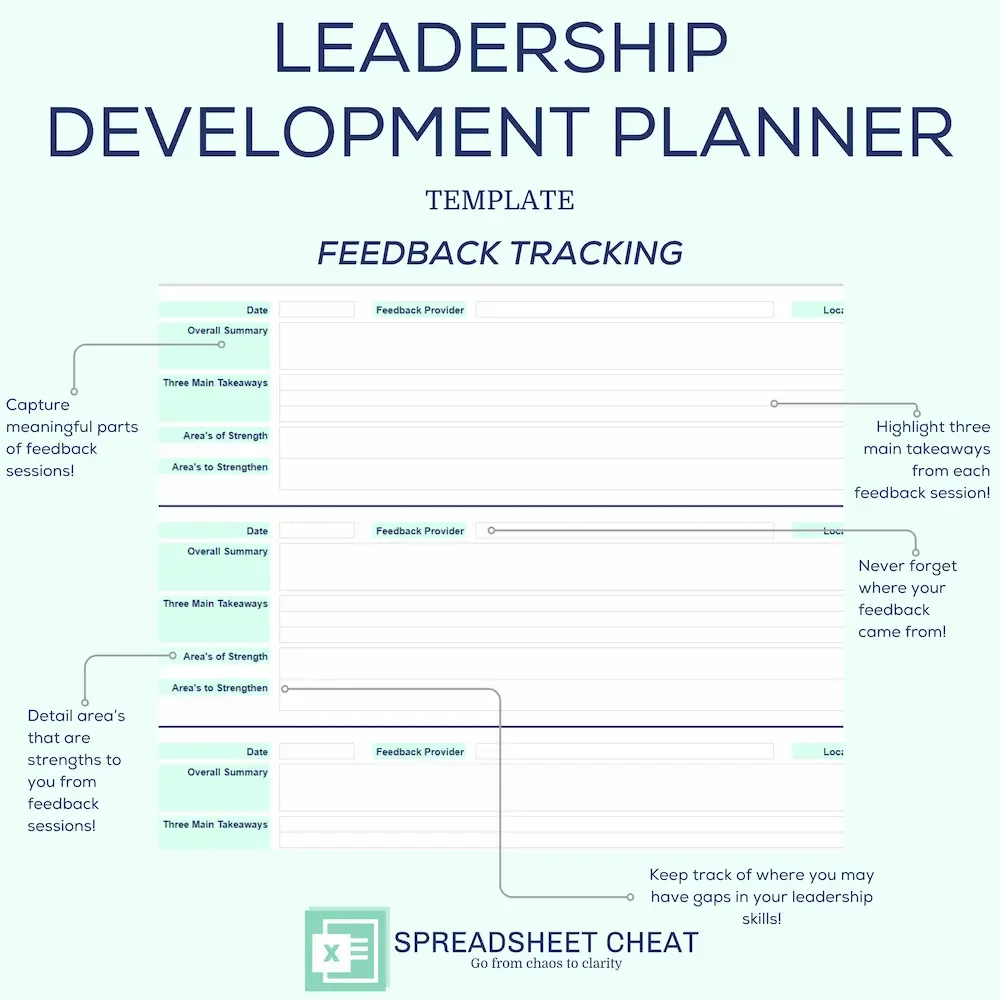
Elevate your leadership capabilities and empower your team's growth journey with our comprehensive Leadership Development Planner, meticulously crafted for Microsoft Excel. This dynamic template comprises three essential sections—Feedback Tracking, Skill Assessment, and Goal Setting—to streamline your development process and drive tangible results.
Feedback Tracking: Effortlessly collect and analyze feedback from peers, supervisors, and stakeholders with our intuitive Feedback Tracking section. Each session allows you to record crucial details such as the date, feedback provider, and session location. Dive deep into insightful summaries, identifying three main takeaways, areas of strength, and actionable areas to strengthen.
Skill Assessment: Assess and enhance your leadership skills systematically with our Skill Assessment section. Rate your proficiency across key areas, including communication, decision-making, conflict resolution, and emotional intelligence. Customize additional skill areas to align with your unique development goals. Leverage the platform to identify growth opportunities, set actionable goals, and access curated resources and mentorship.
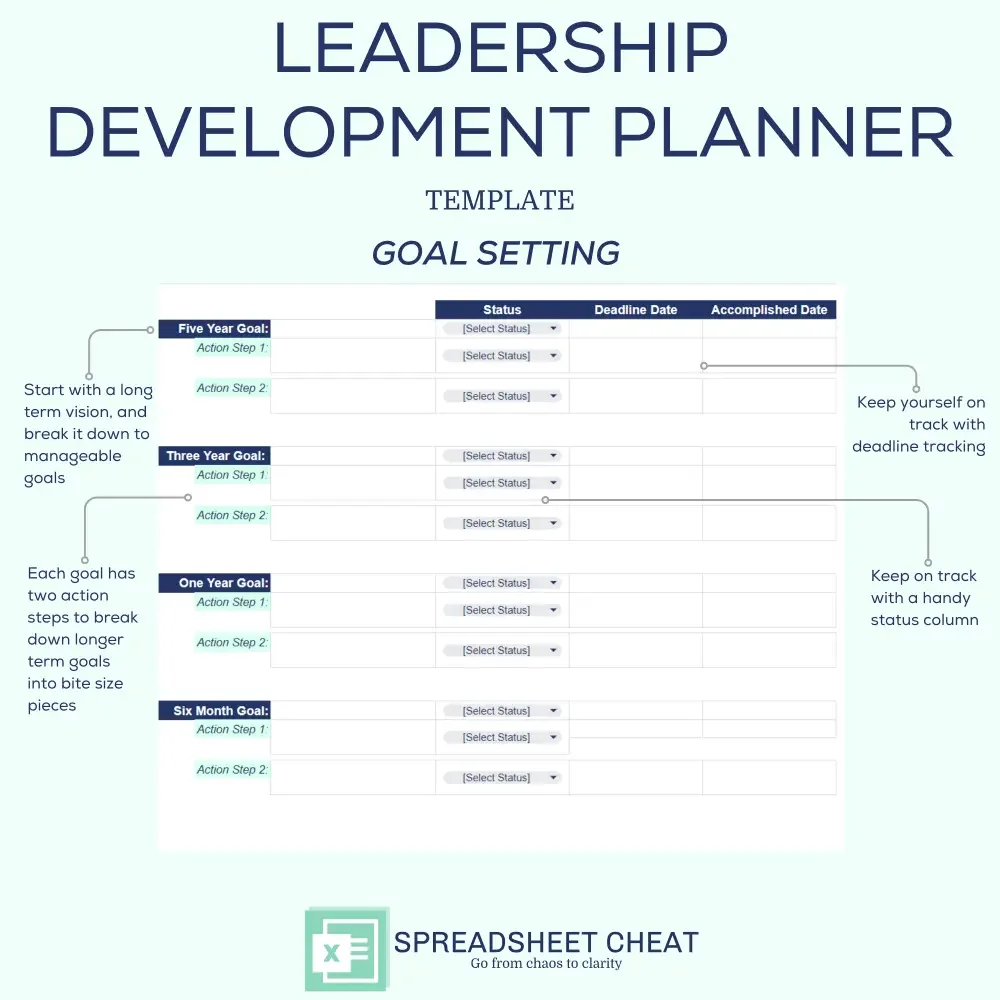
Goal Setting: Drive your leadership journey forward with clarity and purpose using our Goal Setting section. Define ambitious goals for the next 5 years, 3 years, 1 year, and 6 months, each supported by two actionable steps. Track progress seamlessly with status updates, deadline dates, and accomplished dates. Harness the power of structured goal setting to propel yourself toward leadership excellence.
Comprehensive Feedback Tracking: Seamlessly capture, organize, and analyze feedback from various sources to gain practical knowledge about individual and team dynamics, facilitating targeted growth and improvement initiatives.
Dynamic Skill Assessment: Assess and enhance leadership skills with precision using customizable rating scales, empowering individuals to identify strengths, areas for development, and actionable strategies for growth.
Strategic Goal Setting: Move forward in your leadership journey by setting clear goals for different time periods, with specific action steps, deadlines, and ways to track your progress to make sure you stay aligned with your organization's goals.
Collaborative Data Insights: Get a complete picture of how individuals and teams are performing with easy-to-understand data tools, helping you make informed decisions and encouraging teamwork and responsibility.
Streamlined Progress Monitoring: Effortlessly track progress on feedback implementation, skill enhancement, and goal achievement with intuitive status updates, deadline reminders, and milestone tracking features for enhanced accountability and visibility.
Compatibility: The Leadership Development Planner Template is compatible with Microsoft Excel. While transferring to other platforms like Google Sheets or Mac Numbers is possible, consistent formatting and structure are not guaranteed.
Visual Consistency: Colors may vary slightly between digital and in-person displays due to individual device color calibrations.
This listing is an instant DIGITAL DOWNLOAD only (no physical product will be shipped).
Affiliation: Spreadsheet Cheat is not affiliated with Microsoft Excel.
Refunds: As this is a digital download that occurs instantly, all transactions are final. Order cancellations, returns, and exchanges are not permitted, as digital purchases are inherently irrevocable.
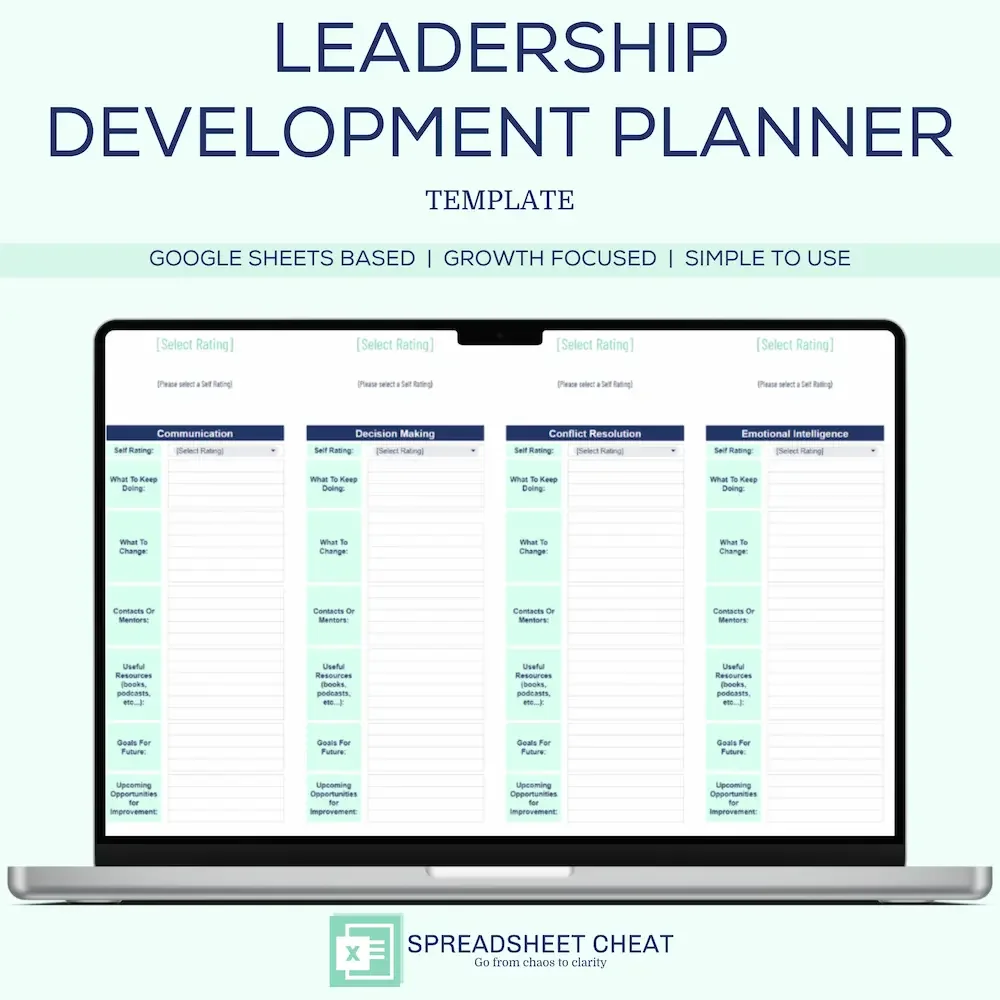
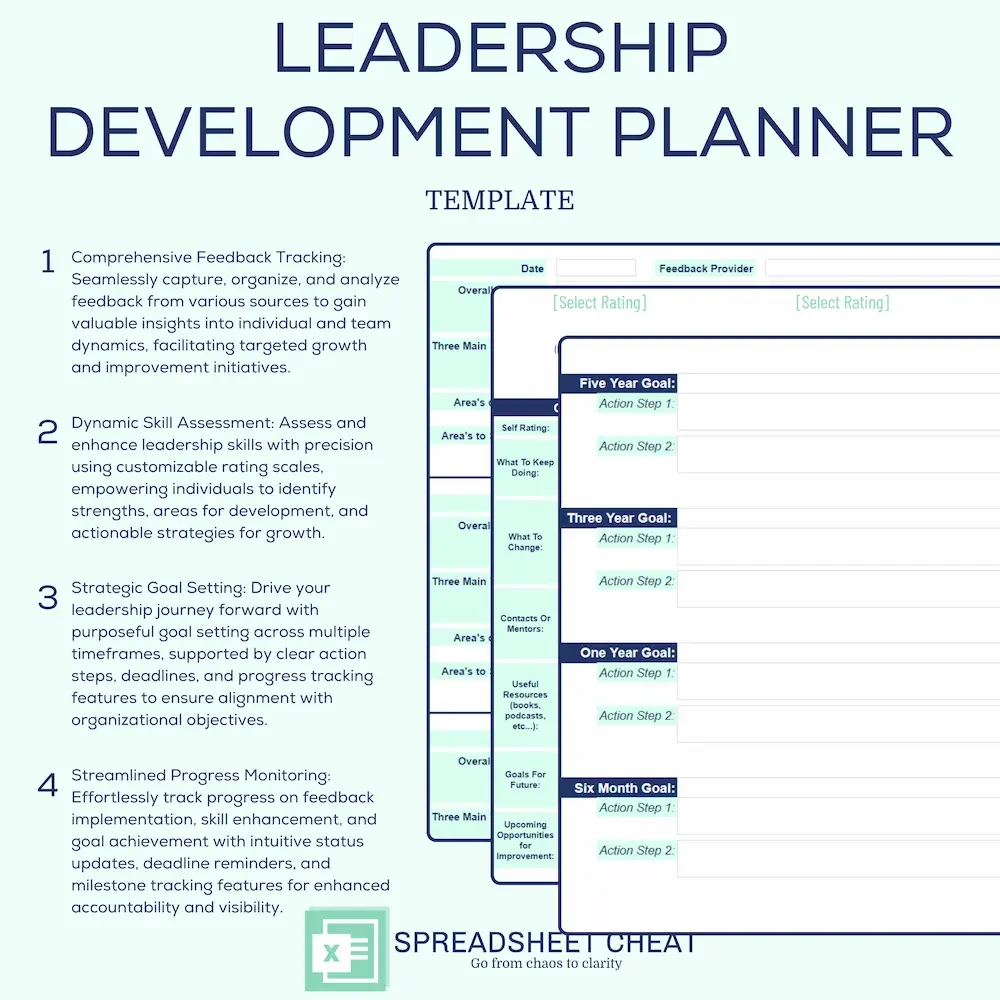
Elevate your leadership capabilities and empower your team's growth journey with our comprehensive Leadership Development Planner, meticulously crafted for Google Sheets. This dynamic template comprises three essential sections—Feedback Tracking, Skill Assessment, and Goal Setting—to streamline your development process and drive tangible results.
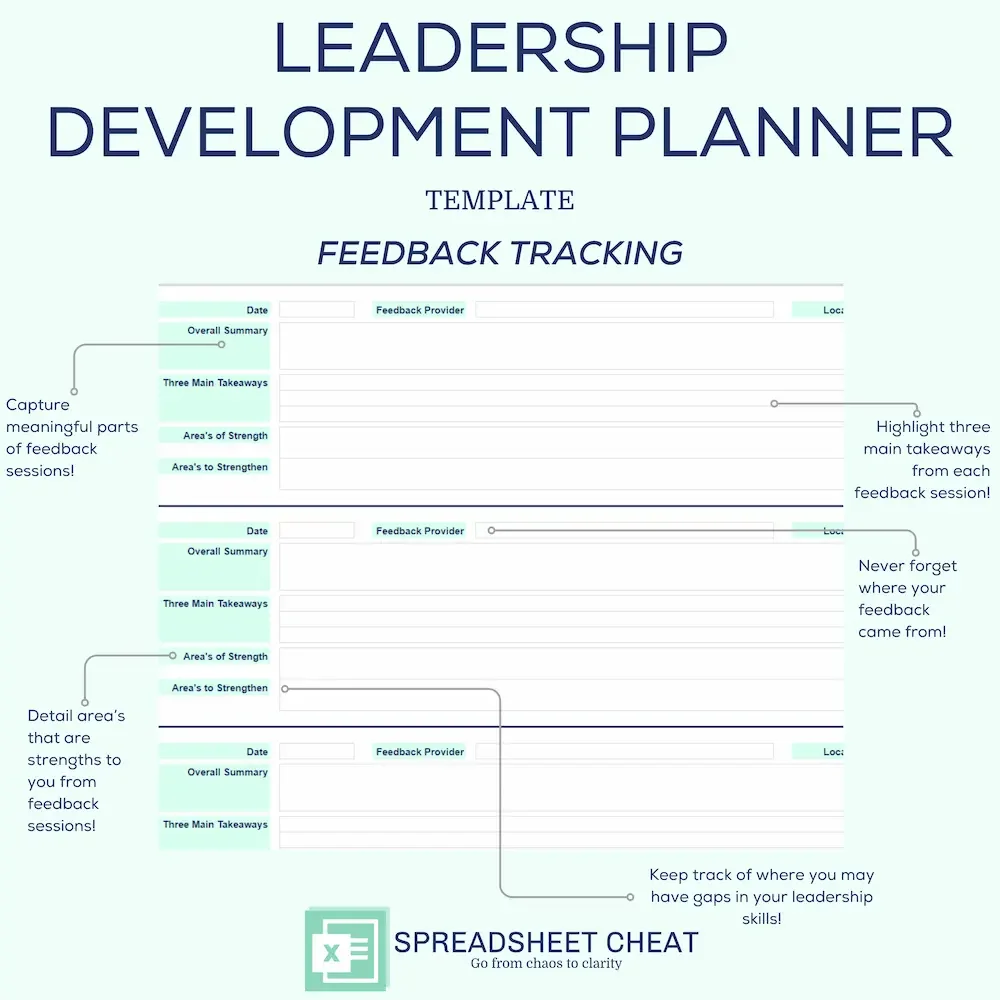
Feedback Tracking: Effortlessly collect and analyze feedback from peers, supervisors, and stakeholders with our intuitive Feedback Tracking section. Each session allows you to record crucial details such as the date, feedback provider, and session location. Dive deep into insightful summaries, identifying three main takeaways, areas of strength, and actionable areas to strengthen.
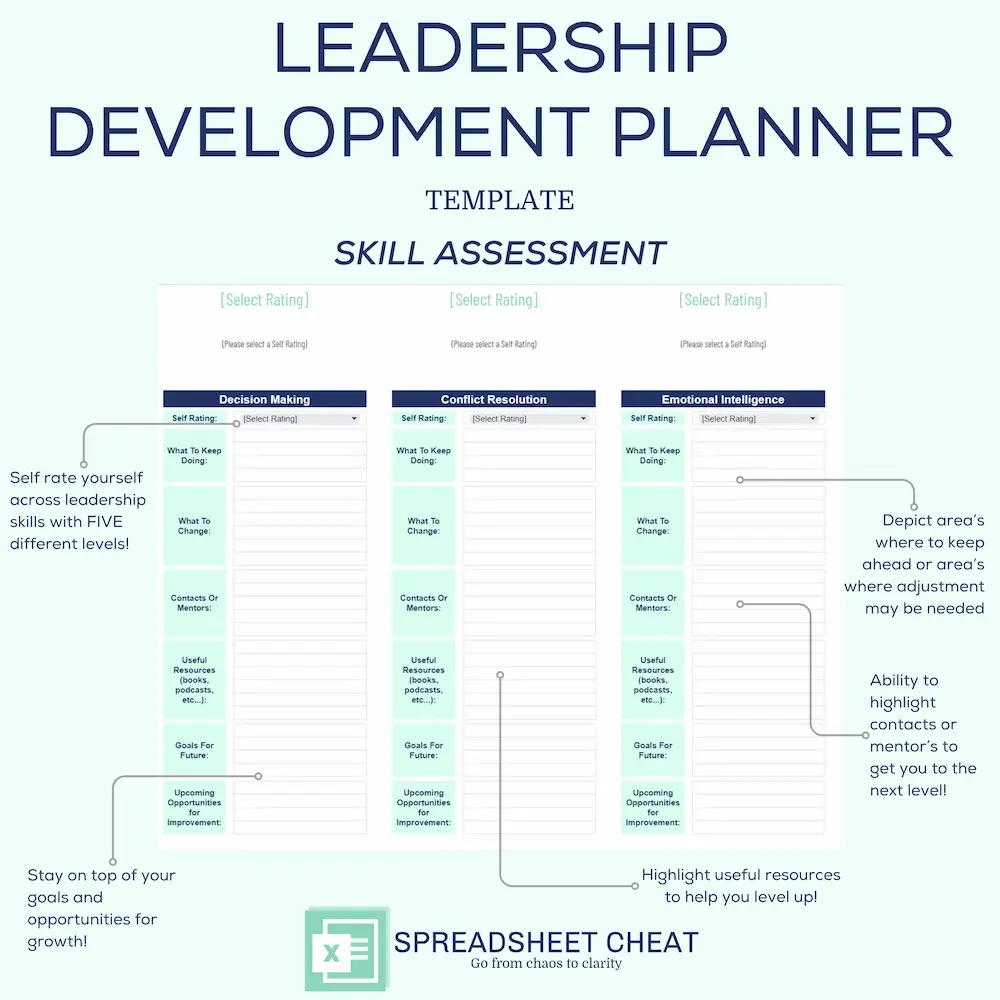
Skill Assessment: Assess and enhance your leadership skills systematically with our Skill Assessment section. Rate your proficiency across key areas, including communication, decision-making, conflict resolution, and emotional intelligence. Customize additional skill areas to align with your unique development goals. Leverage the platform to identify growth opportunities, set actionable goals, and access curated resources and mentorship.
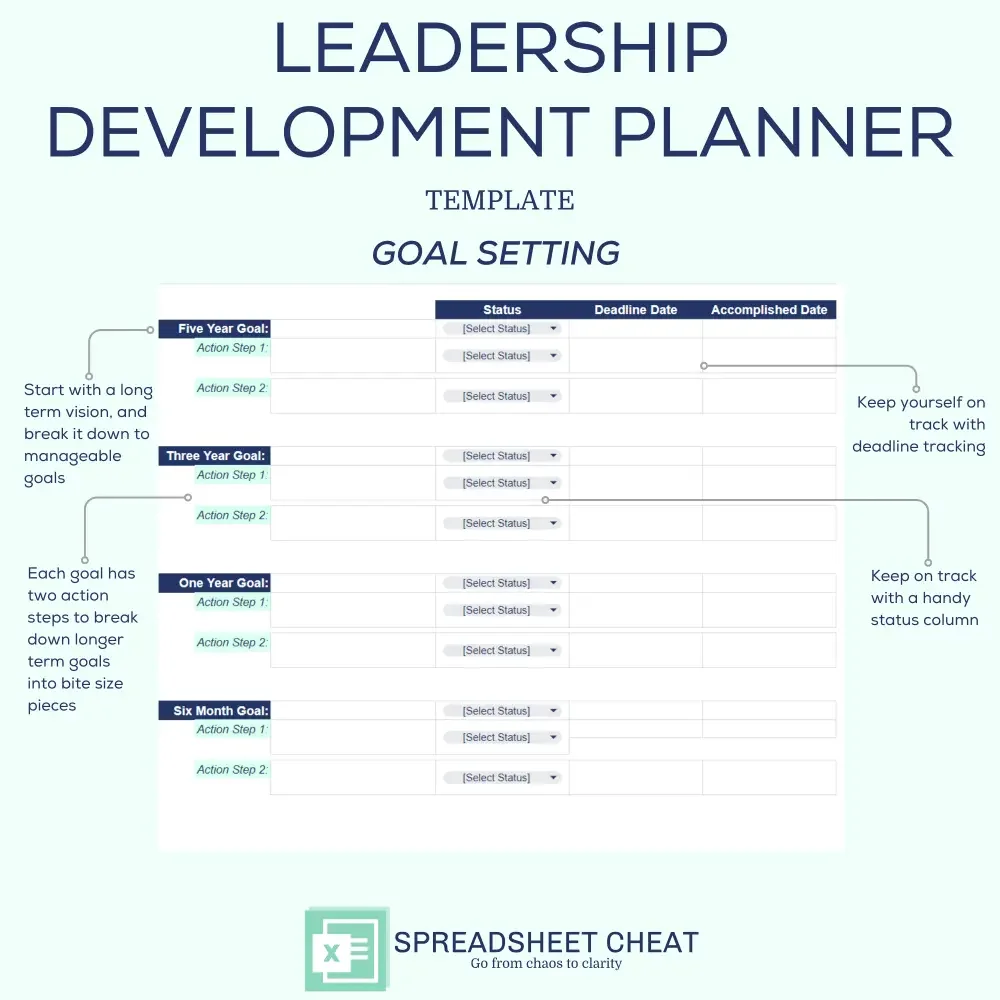
Goal Setting: Drive your leadership journey forward with clarity and purpose using our Goal Setting section. Define ambitious goals for the next 5 years, 3 years, 1 year, and 6 months, each supported by two actionable steps. Track progress seamlessly with status updates, deadline dates, and accomplished dates. Harness the power of structured goal setting to propel yourself toward leadership excellence.
Comprehensive Feedback Tracking: Seamlessly capture, organize, and analyze feedback from various sources to gain practical knowledge about individual and team dynamics, facilitating targeted growth and improvement initiatives.
Dynamic Skill Assessment: Assess and enhance leadership skills with precision using customizable rating scales, empowering individuals to identify strengths, areas for development, and actionable strategies for growth.
Strategic Goal Setting: Move forward in your leadership journey by setting clear goals for different time periods, with specific action steps, deadlines, and ways to track your progress to make sure you stay aligned with your organization's goals.
Collaborative Data Insights: Get a complete picture of how individuals and teams are performing with easy-to-understand data tools, helping you make informed decisions and encouraging teamwork and responsibility.
Streamlined Progress Monitoring: Effortlessly track progress on feedback implementation, skill enhancement, and goal achievement with intuitive status updates, deadline reminders, and milestone tracking features for enhanced accountability and visibility.
Compatibility: The Leadership Development Planner Template is compatible with Google Sheets. While transferring to other platforms like Microsoft Excel or Mac Numbers is possible, consistent formatting and structure are not guaranteed.
Visual Consistency: Colors may vary slightly between digital and in-person displays due to individual device color calibrations.
This listing is an instant DIGITAL DOWNLOAD only (no physical product will be shipped).
Affiliation: Spreadsheet Cheat is not affiliated with Google Sheets.
Refunds: As this is a digital download that occurs instantly, all transactions are final. Order cancellations, returns, and exchanges are not permitted, as digital purchases are inherently irrevocable.
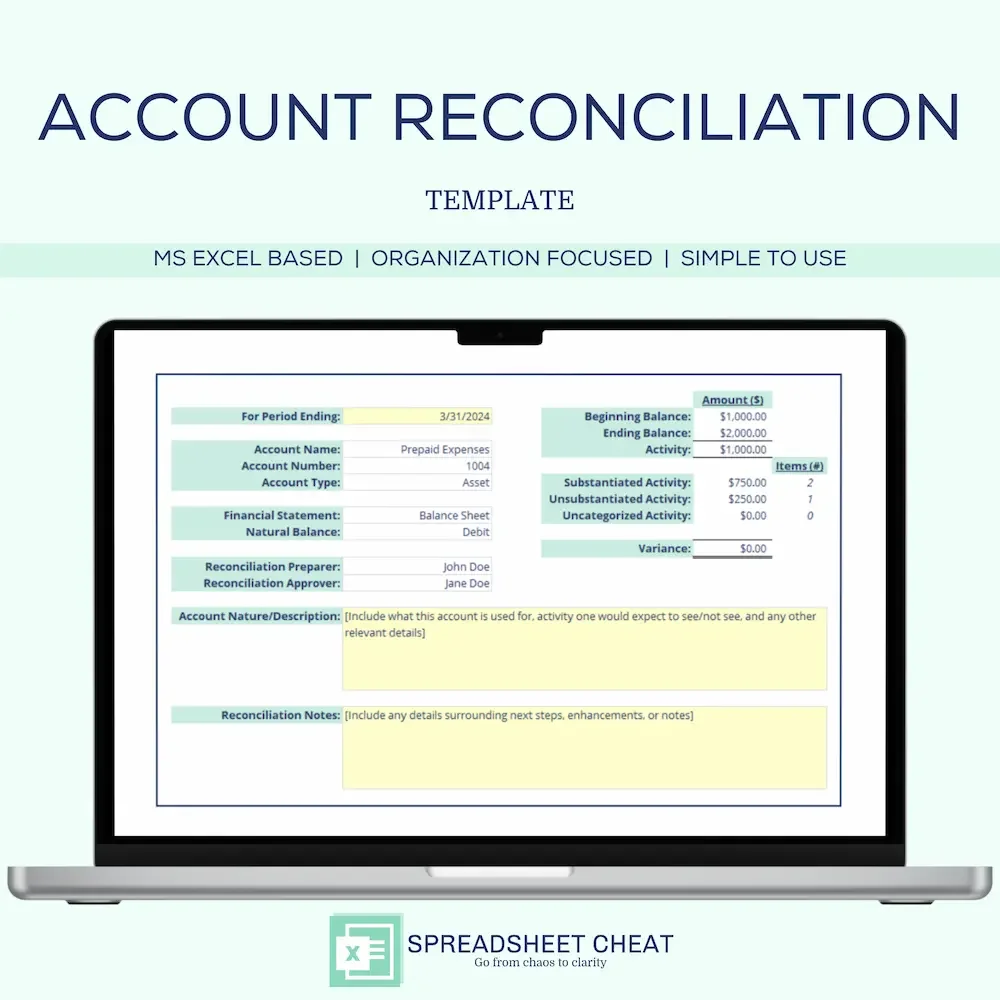
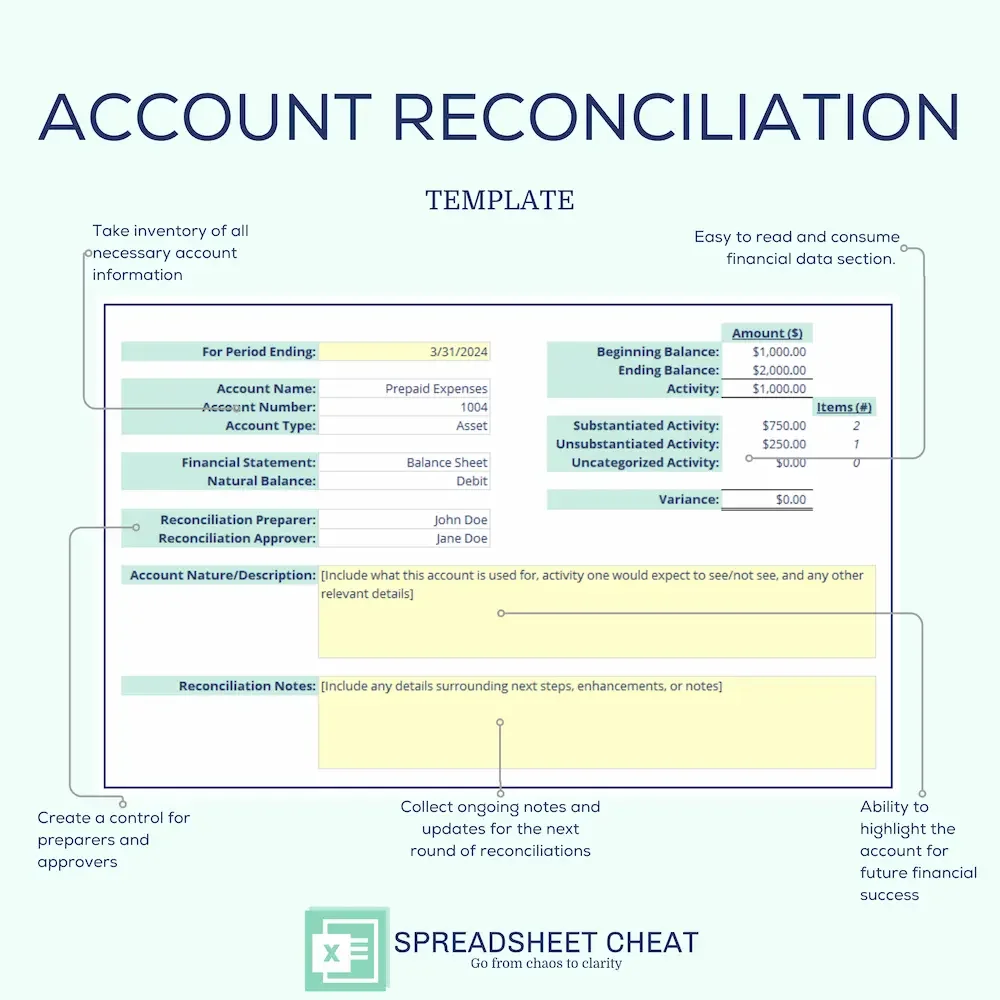
Take control of your business finances with our comprehensive Account Reconciliation Template, specifically designed for small business owners. This powerful Microsoft Excel tool simplifies the reconciliation process, ensuring accuracy and efficiency in managing your financial accounts.
Crucial Financial Management: Regular account reconciliation is essential for maintaining accurate financial records, identifying discrepancies, and preventing fraud. Our template helps you stay on top of your finances with ease.
Audit Preparation Made Simple: Always be audit-ready with our organized approach. The template includes a General Ledger input tab, categorizing substantiated and unsubstantiated transactions, and a dedicated tab for storing supporting documentation.
Enhanced Financial Clarity: Gain a clear understanding of your financial standing. The structured format allows you to track all transactions, ensuring nothing is overlooked.
Facilitates Knowledge Transfer: Simplify finance knowledge transfer sessions with a well-documented and systematic reconciliation process. Ideal for onboarding new team members or during audits.
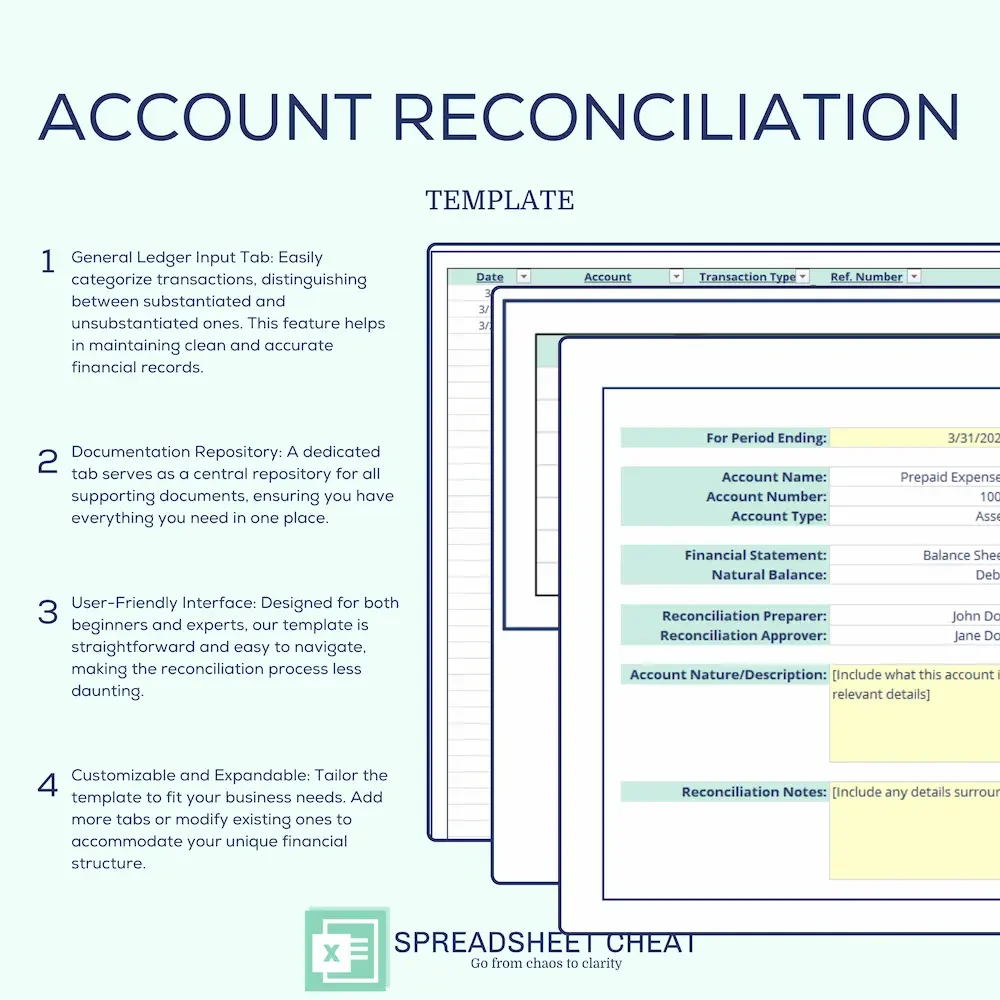
General Ledger Input Tab: Easily categorize transactions, distinguishing between substantiated and unsubstantiated ones. This feature helps in maintaining clean and accurate financial records.
Documentation Repository: A dedicated tab serves as a central repository for all supporting documents, ensuring you have everything you need in one place.
User-Friendly Interface: Designed for both beginners and experts, our template is straightforward and easy to navigate, making the reconciliation process less daunting.
Customizable and Expandable: Tailor the template to fit your business needs. Add more tabs or modify existing ones to accommodate your unique financial structure.
Compatibility: This Account Reconciliation Template is exclusively for Microsoft Excel. It is designed to maintain consistent formatting and structure, ensuring a smooth user experience.
Visual Consistency: Colors may vary slightly between digital and in-person displays due to individual device color calibrations.
This listing is an instant DIGITAL DOWNLOAD ONLY (no physical product will be shipped).
Affiliation: Spreadsheet Cheat is not affiliated with Microsoft Excel.
Refunds: As this is a digital download that occurs instantly, all transactions are final. Order cancellations, returns, and exchanges are not permitted, as digital purchases are inherently irrevocable.
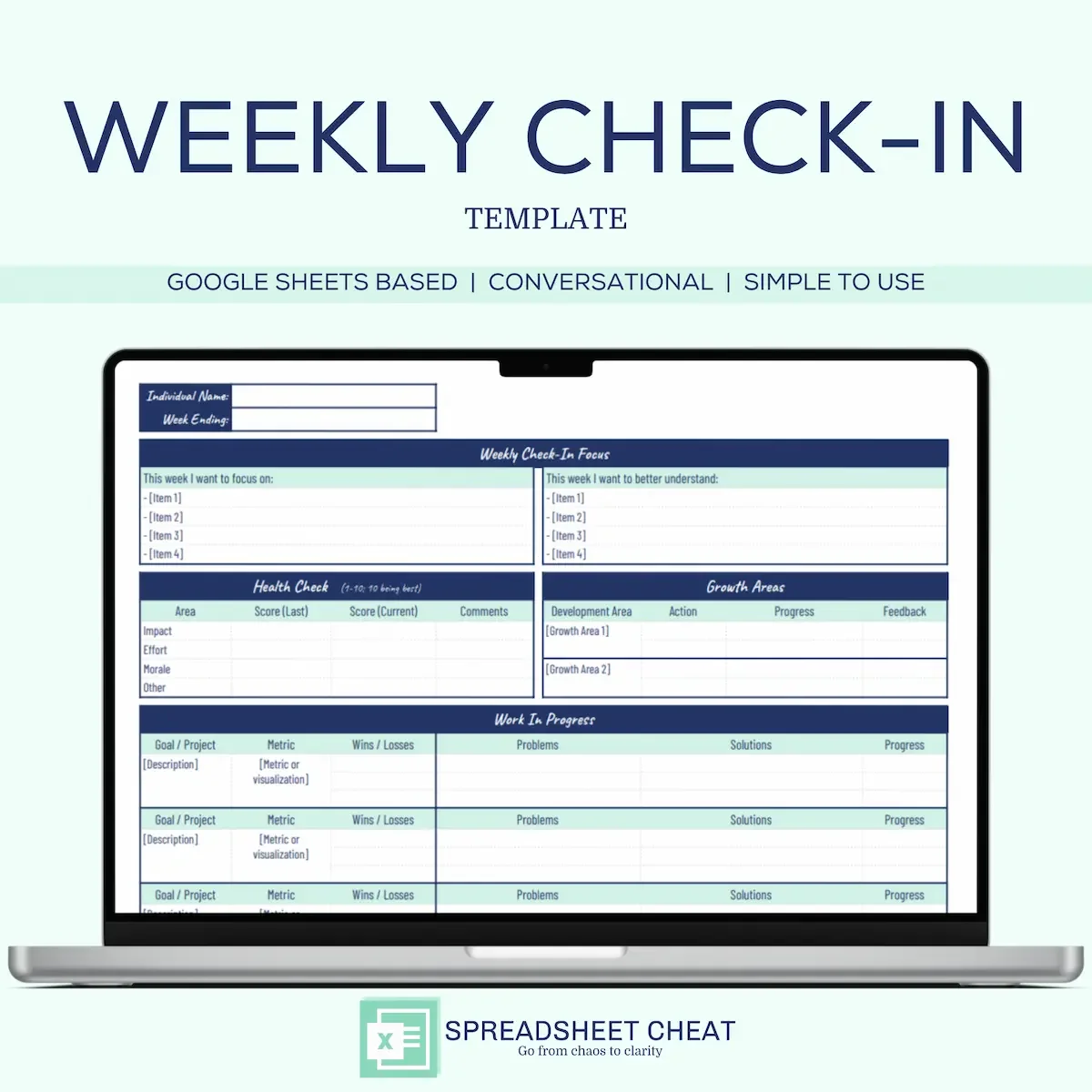
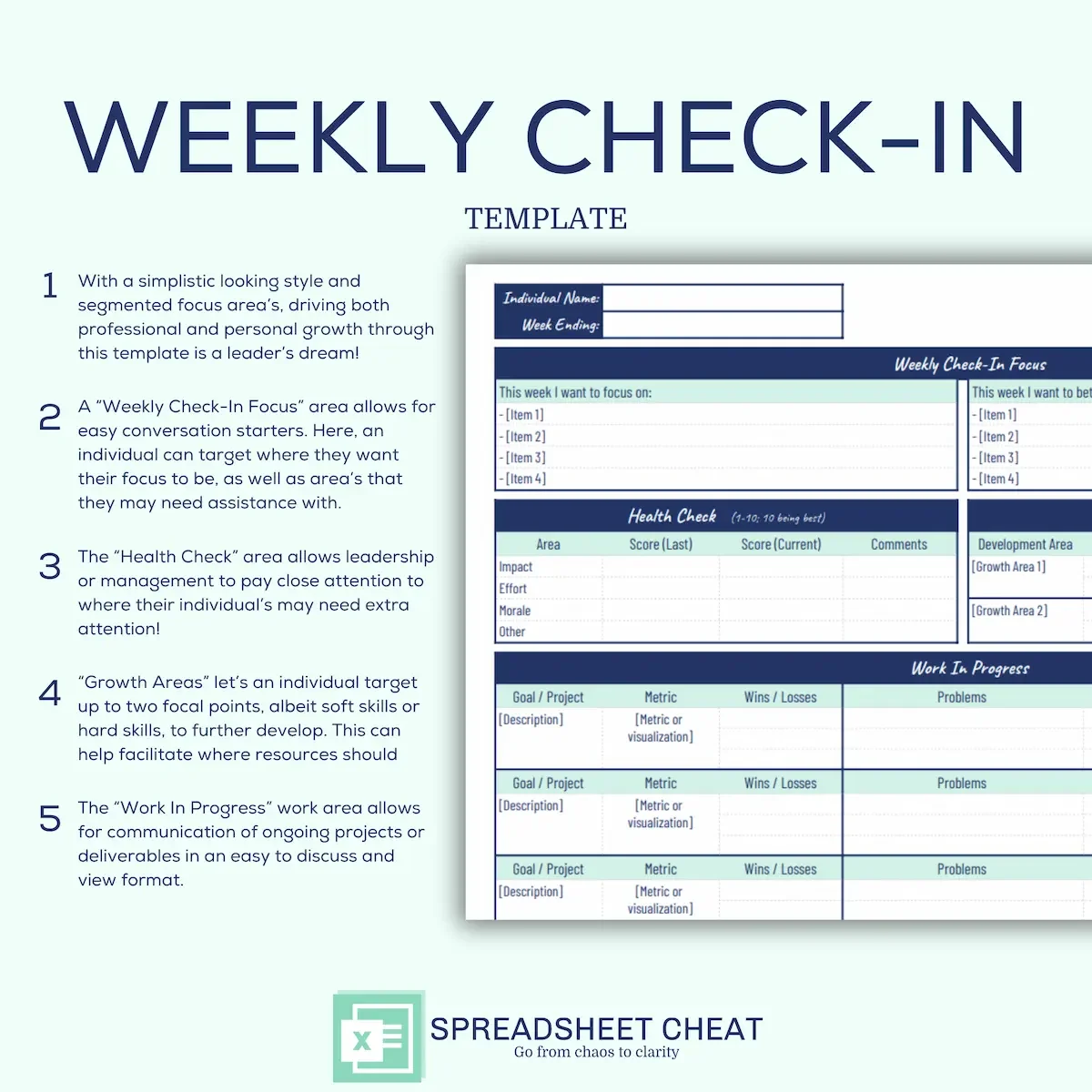
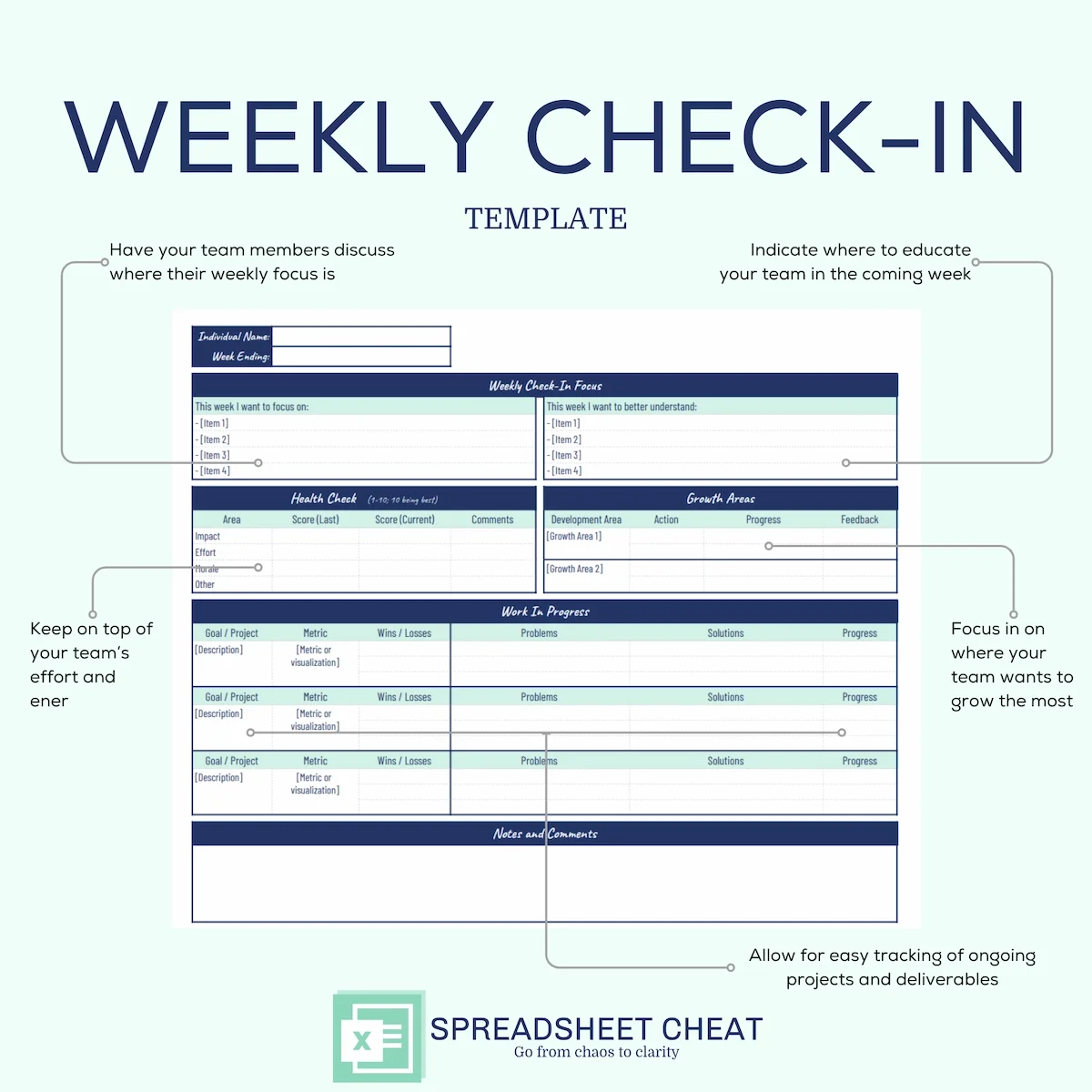
Improve team communication and foster growth with our Weekly Check-In Template, a dynamic Google Sheets tool designed for leaders and managers to connect with their team members effectively. Streamline your weekly check-ins and elevate collaboration with features that empower individuals to focus on their goals, assess their well-being, and drive meaningful conversations.
Enhanced Team Communication: Facilitate constructive conversations with a structured Weekly Focus section, allowing individuals to highlight what they want to achieve and improve on a weekly basis.
Holistic Well-being Monitoring: Utilize the Health Check section to assess impact, effort, and morale on a 1–10 scale. Constantly monitor individual well-being for a healthier and more productive team.
Targeted Growth Areas: Empower individuals to identify and address growth areas with leadership support. The Growth Areas section allows team members to focus on two specific areas for development.
Project Management Made Simple: Efficiently manage projects with the Work in Progress section, capturing up to three projects or deliverables. Track metrics, wins or losses, ongoing problems, and proposed solutions in one centralized location.
Seamless Collaboration: Drive collaboration with a dedicated Notes/Comments section, providing space for one-off items and fostering open communication within the team.
User-Friendly Interface: Designed with simplicity in mind, our template ensures ease of use for both spreadsheet novices and experts. No complex formulas—just intuitive fields for effortless navigation.
Customizable and Expandable: Tailor the template to your team's unique needs. Easily replicate tabs multiple times, making it simple to expand and adapt to evolving requirements.
Comprehensive Data Insights: Get valuable perspectives on individual and team dynamics. The template can generate visual representations, including charts and trendlines, making it easy to interpret and act on data.
Time-Saving Data Entry: Say goodbye to tedious data entry. Our streamlined fields simplify the process, allowing you to spend more time focusing on strategic initiatives.
Compatibility: The Weekly Check-In Template is compatible with Google Sheets. While transferring to other platforms like Google Sheets or Mac Numbers is possible, consistent formatting and structure are not guaranteed.
Visual Consistency: Colors may vary slightly between digital and in-person displays due to individual device color calibrations.
This listing is an instant DIGITAL DOWNLOAD ONLY (no physical product will be shipped).
Affiliation: Spreadsheet Cheat is not affiliated with Google Sheets.
Refunds: As this is a digital download that occurs instantly, all transactions are final. Order cancellations, returns, and exchanges are not permitted, as digital purchases are inherently irrevocable.
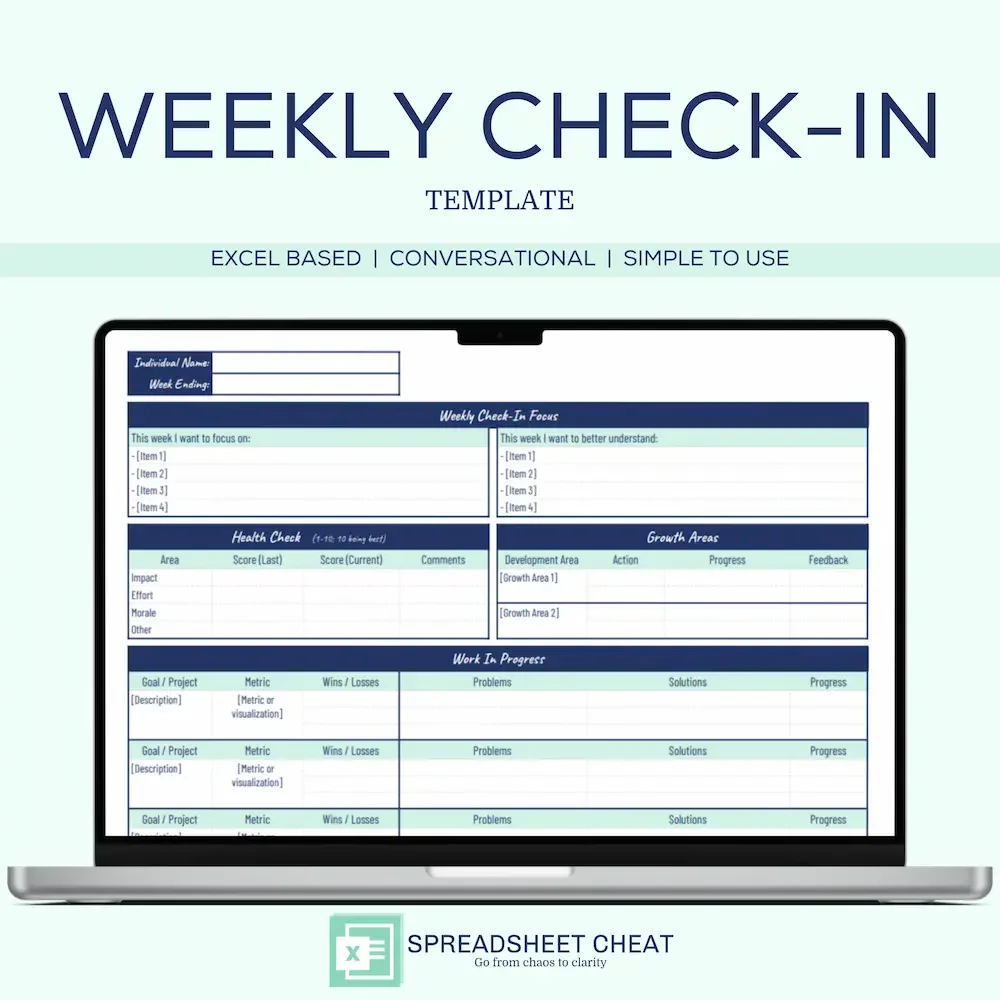
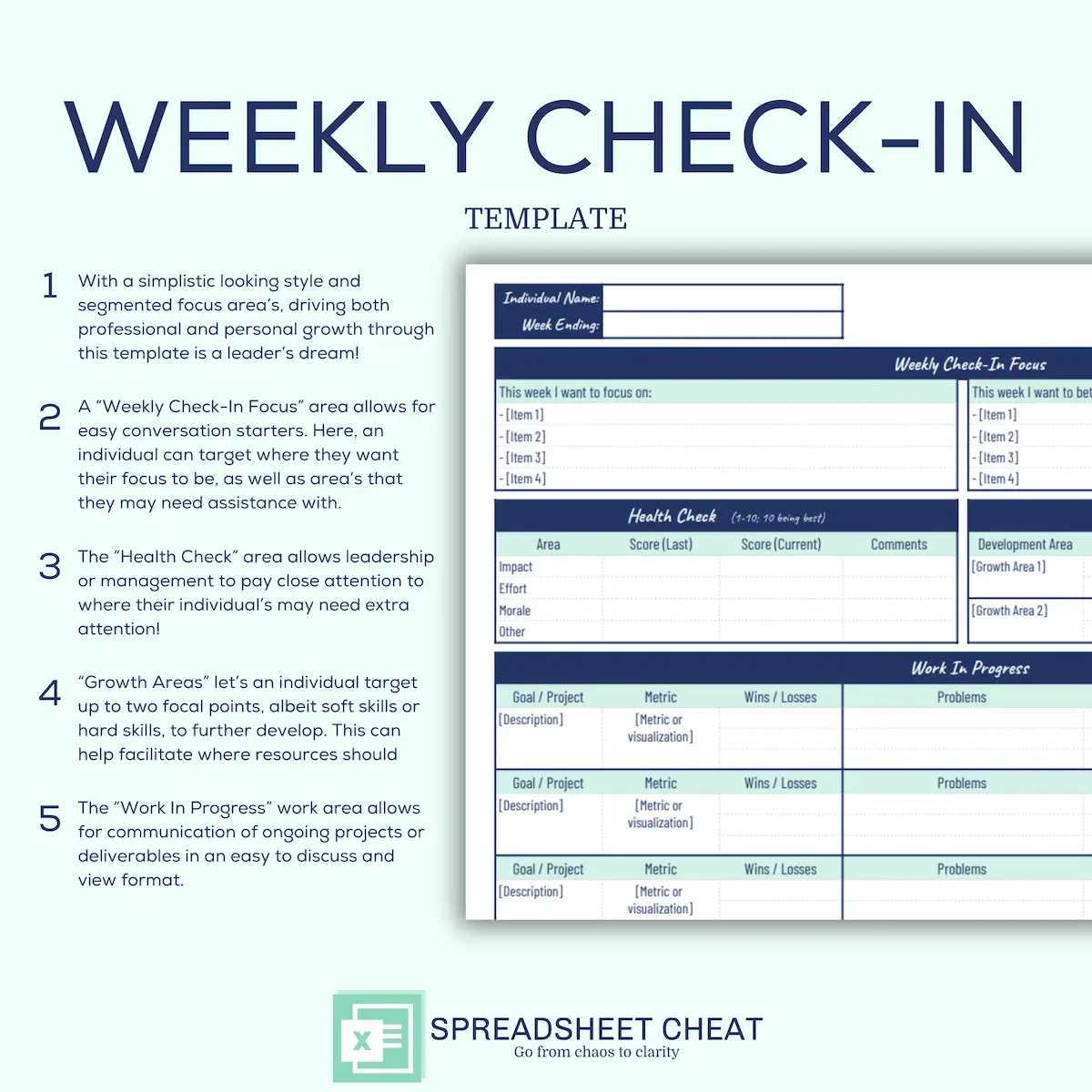
Improve team communication and foster growth with our Weekly Check-In Template, a dynamic Microsoft Excel tool designed for leaders and managers to connect with their team members effectively. Streamline your weekly check-ins and elevate collaboration with features that empower individuals to focus on their goals, assess their well-being, and drive meaningful conversations.
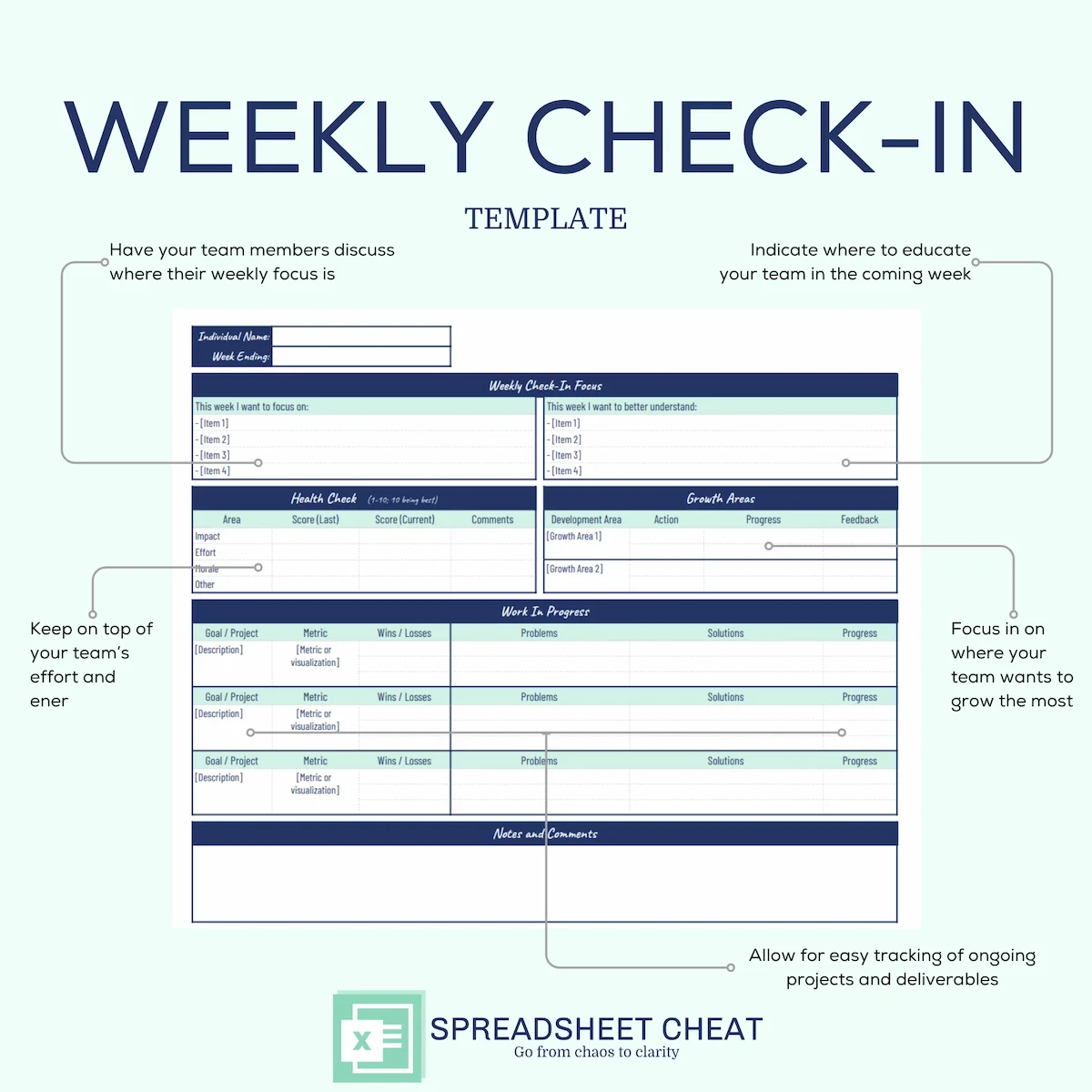
Enhanced Team Communication: Facilitate constructive conversations with a structured Weekly Focus section, allowing individuals to highlight what they want to achieve and improve on a weekly basis.
Holistic Well-being Monitoring: Utilize the Health Check section to assess impact, effort, and morale on a 1–10 scale. Constantly monitor individual well-being for a healthier and more productive team.
Targeted Growth Areas: Empower individuals to identify and address growth areas with leadership support. The Growth Areas section allows team members to focus on two specific areas for development.
Project Management Made Simple: Efficiently manage projects with the Work in Progress section, capturing up to three projects or deliverables. Track metrics, wins or losses, ongoing problems, and proposed solutions in one centralized location.
Seamless Collaboration: Drive collaboration with a dedicated Notes/Comments section, providing space for one-off items and fostering open communication within the team.
User-Friendly Interface: Designed with simplicity in mind, our template ensures ease of use for both spreadsheet novices and experts. No complex formulas—just intuitive fields for effortless navigation.
Customizable and Expandable: Tailor the template to your team's unique needs. Easily replicate tabs for multiple times, making it simple to expand and adapt to evolving requirements.
Comprehensive Data Insights: Get valuable perspectives on individual and team dynamics. The template can generate visual representations, including charts and trendlines, making it easy to interpret and act on data.
Time-Saving Data Entry: Say goodbye to tedious data entry. Our streamlined fields simplify the process, allowing you to spend more time focusing on strategic initiatives.
Compatibility: The Weekly Check-In Template is compatible with Microsoft Excel. While transferring to other platforms like Google Sheets or Mac Numbers is possible, consistent formatting and structure are not guaranteed.
Visual Consistency: Colors may vary slightly between digital and in-person displays due to individual device color calibrations.
This listing is an instant DIGITAL DOWNLOAD ONLY (no physical product will be shipped).
Affiliation: Spreadsheet Cheat is not affiliated with Microsoft Excel.
Refunds: As this is a digital download that occurs instantly, all transactions are final. Order cancellations, returns, and exchanges are not permitted, as digital purchases are inherently irrevocable.
No results match your search. Try removing a few filters.

